 Autism Agent
How to use Autism Agent
Two roles: the person who communicates (Speak mode) and the caregiver who builds the board with real photos (Admin). Here's how both work. For the complete walkthrough, see the full tutorial.
Watch the flow
Screenshots from the real app — click any screen to enlarge. Or try the interactive tour on the home page.
For the person communicating
The Speak screen is calm and distraction-free. No account needed — just tap and hear words.
-
Tap a picture to speak
Each card shows a photo or pictogram with a spoken label. One tap speaks it instantly — great for single words like Yes, No, More, or Help.
-
Build a sentence
Switch to Build a sentence on the mode bar. Tap cards to add chips — I → want → juice. Tap a chip to edit or remove it. Tap Speak when ready; the bar clears afterward.
-
Swap picture cards and keyboard
Tap the keyboard icon on the mode bar — the picture grid swaps to an inline spelling keyboard on the same screen (no popup). English word prediction helps finish words. Tap the picture icon to show cards again.
-
Use categories
Filter cards by category: People, Places, Food, Feelings, and more. Quick Words stay pinned above the grid for one-tap access.
Custom cards from your camera or photo library
Autism Agent ships with 128 starter pictograms so you can speak from day one — but the real power is swapping in your pictures. Faces they recognize, foods they eat, places they go.
-
Open Admin
Tap the gear icon on Speak and authenticate with Face ID, Touch ID, or passcode. Optional: Control Panel → Speak Screen → Require hold for Admin on shared devices.
-
Tap Add Card
The picker opens camera-first — take a photo right now — with recent library photos below. Or browse your full photo library.
-
Name it and categorize
Type the spoken label (what the app says when they tap) and pick a category. The card appears on the board immediately.
-
Replace starter cards anytime
Tap any existing card to change its photo, label, or category. Build a board that's entirely your photos, or mix pictograms and pictures.
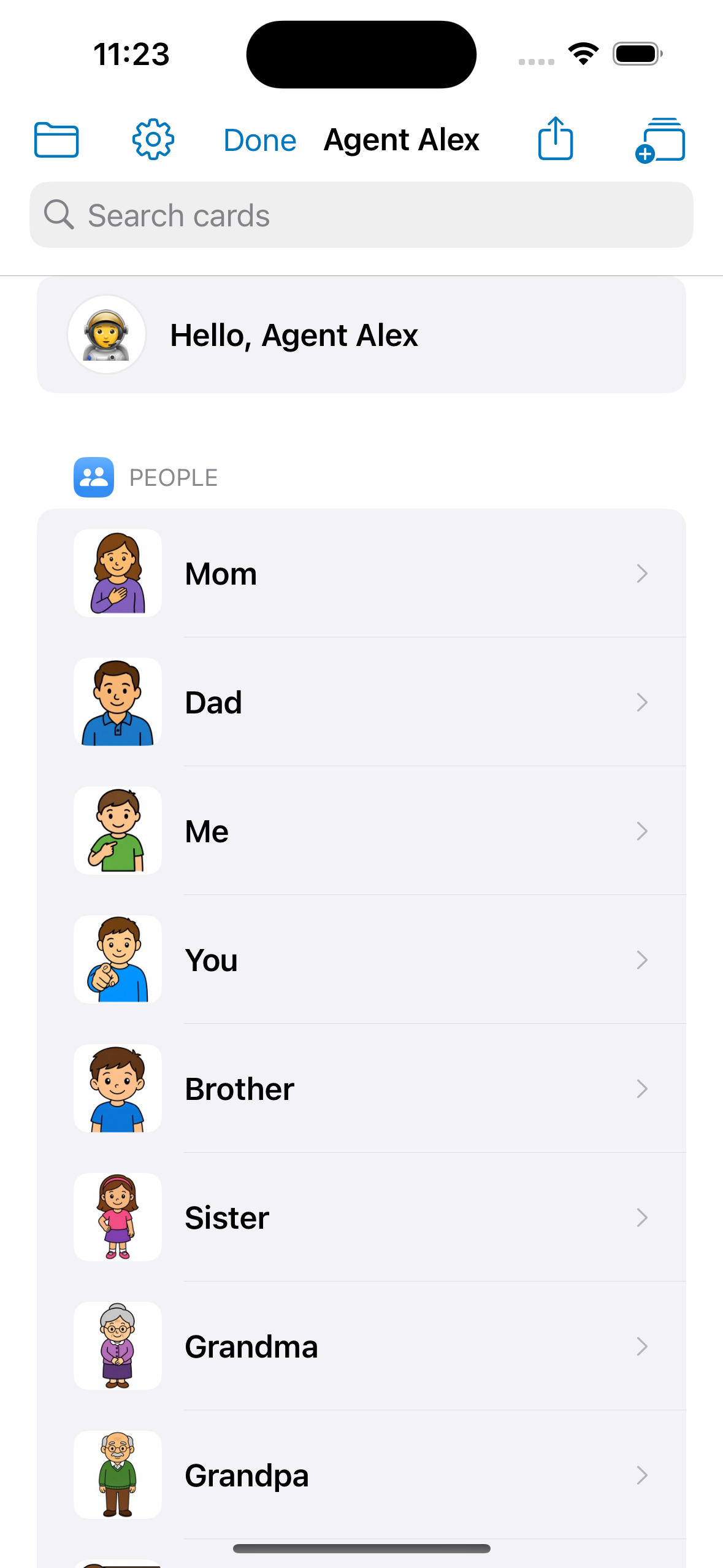
For caregivers
Admin is hidden on purpose so the communication board stays safe and focused. This is where you add photos, organize categories, and share with family.
-
Open Admin
Tap the gear on the Speak screen, then authenticate with Face ID, Touch ID, or passcode. Optional: Control Panel → Speak Screen → Require hold for Admin if a child shares the device.
-
Add cards with real photos
Tap Add Card (separate from Share). The picker opens camera-first with recent photos — or choose from your library. Write the spoken label and pick a category.
-
Organize categories
Create or edit categories to match your child's world — school, therapists, favorite foods, daily routines.
-
Pin Quick Words
Drag cards into the Quick Words row for one-tap access to Yes, No, More, and Help. The row stays visible even when empty so you can always add more.
-
Adjust voice and display
In Control Panel, set voice, speech rate, pitch, grid size, and student-safe mode. Test the greeting before handing the device back.
First-time setup
- Install Autism Agent from the App Store
- Complete the quick agent setup (name + avatar)
- 128 starter pictograms load automatically — replace any with your own photos
- Tap Add Card for camera-first photos or pick from your library
- Enable student-safe mode for a calmer, focused board
Caregiver vs viewer devices
Caregiver device — adds and edits cards, sends the share link, full Control Panel access.
Viewer device — opens the caregiver's invite link; read-only board with Admin hidden.
Every device uses the same quick setup (name + avatar). Viewer mode starts automatically when a share link is accepted.
Sharing with family (Autism Agent Plus)
With Plus ($4.99/month), every custom card and photo is backed up to your private iCloud. Sync across your devices and share the library read-only with a family member on their own Apple ID and device.
-
Subscribe to Plus
Control Panel → Autism Agent Plus. Restart the app after subscribing to enable iCloud sync.
-
Send a share link from Admin
Tap Share (not Add Card) and send the invite link by Messages, Mail, or any app. Use Manage or stop sharing to see participants or end access.
-
If you stop and share again
Stopping sharing invalidates the old link. Tap Share again for a new invite — viewers open the new link to reconnect.
-
Accept on the child's device
Install Autism Agent on their iPhone or iPad from the App Store, complete the quick setup, and open the share link while signed into their Apple ID. Cards appear read-only.
-
New cards sync automatically
When you add cards on your phone, they appear on the viewer device. No re-sharing needed.